
April 14, 2025
Crop Hub: Updates for the 2025 Growing Season
Learn more about what's new with Crop Hub for 2025!
New for the 2025 Growing Season
Several new features and functionalities are available for the 2025 growing season. The information below briefly explains the features and how to use them.
Multi-pest select for “List view”
You can now access the "List view" when more than one pest is selected. The previous version only allowed access to list view when one pest was selected. In list view, you can access pest-specific product information including:
- Product name
- Active ingredient
- Efficacy data
- Rate
- Product restrictions (PHI, REI, max applications)
- Chemical group number
- Application comments
Better print experience
Once you’ve completed a search on Crop Hub and selected all the pests you’d like information on, you can click on the "print view" button from the "list view" or “efficacy view” tabs to easily print information using your browser's print function. For best results, set the scale to 60%.
Compare products easily
We’ve added a new filter that allows you to narrow down and compare only the products you are interested in. To use this filter, click “select to compare” on the product card in grid view or use the filter on the right-side menu. Once you’ve selected all the products of interest, click “Only show the X product(s) selected for comparison” button above the first row of product cards.
Sort by efficacy
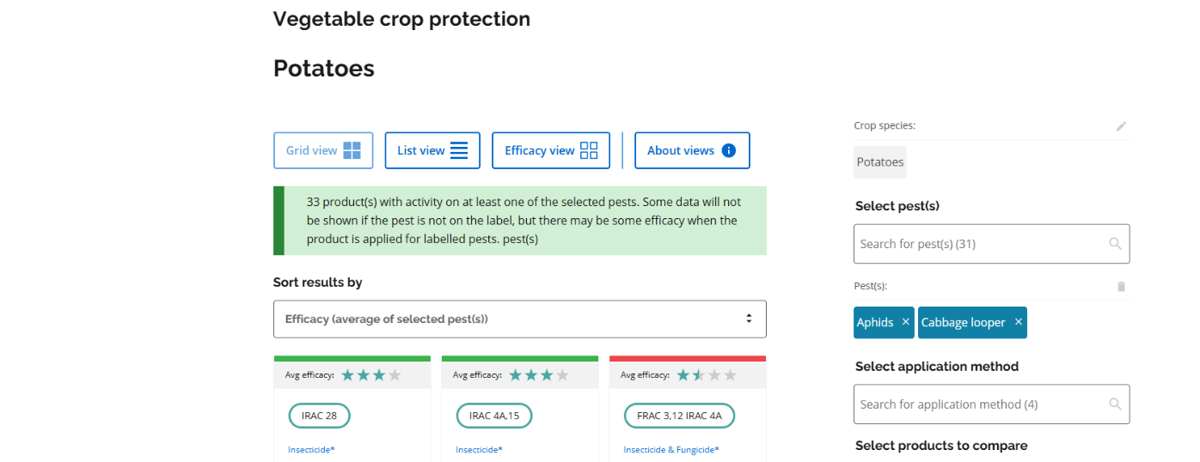
You can now sort by efficacy when pests are selected. To use this option, select pests using the filter on the right-side menu and then toggle “sort results by” to “Efficacy (average of selected pest(s)).” This sort option will reorder the products based on the average efficacy ratings for the pests you’ve selected. If a product does not have efficacy on a pest, it will include a zero efficacy value when calculating the average efficacy. To view individual pest efficacy, click on “view efficacy breakdown.”
If you have feedback on these changes or thoughts on how we can further improve Crop Hub, please email ag.info.omafa@ontario.ca or use our feedback form.